
Make every image shoppable.
Upload a photo of your products in real life, mark what’s for sale, and shoppers can tap anything in the picture to buy it. No coding needed.
Free plan includes every feature. No card required.
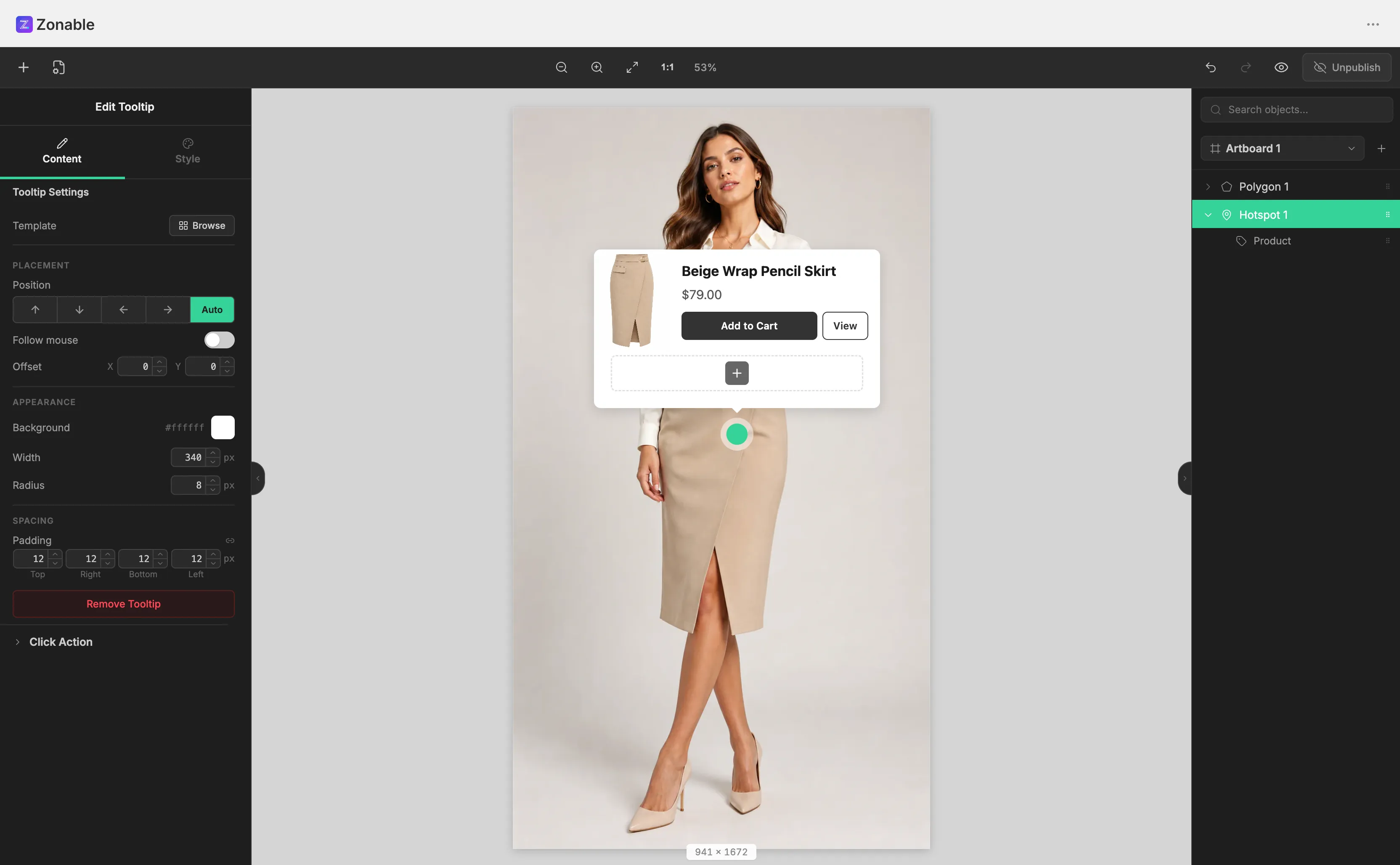
Simple on purpose.
Everything happens on one screen: your photo in the middle, a few simple tools around it. Most merchants publish their first shoppable photo in under ten minutes.
Everything in plain sight
No hidden menus and no buried settings. Every option lives where you'd expect it.
Zero learning curve
Click around an item to mark it, then pick which product it links to. That's the whole workflow.
See what shoppers see
A preview shows exactly what your customers will see, before you publish anything.
Why Zonable
Not just dots on a photo.
Mark the exact shapeOnly on Zonable
Outline the actual sofa or jacket in the photo, so the whole item is clickable. Other apps only let you place a small dot on top of it.
Product cards that pop up
When a shopper taps an item, a little card appears with its photo, price and an Add to cart button. Pick from 12 designs.
11 animated pins
Small glowing dots gently show shoppers where they can tap. 11 styles, from a soft pulse to a radar sweep.
Link images together
A scene can hold several images. Tap a floor on a building photo and its floor plan opens, with a back button included.
3 ways to show it
Just the photo, the photo with a product list next to it, or a whole gallery wall. You choose per scene.
Won’t slow your store
Zonable is tiny and matches your theme's fonts automatically. Your pages stay just as fast as before.
Live in three steps.
No code, no theme edits.Upload any image
Any photo works: a furnished room, an outfit, a menu, a floor plan.
Draw zones, pick products
Mark the items in the photo and choose which of your products each one links to.
Put it on your store
Add Zonable to any page the same way you add any other section in your theme editor. Done.
One app, five storefronts.
Furniture
Shop the room, every piece clickable.
Fashion
Shop the look from lookbook photos.
Food & drink
Interactive menus and wine maps.
Real estate
Clickable floor plans, floor by floor.
Education
Labeled diagrams and campus maps.
Why not just any hotspot app?
“Hotspot” apps put clickable dots on photos. Most on Shopify average ~3.5★, and here's what they leave out.
| Capability | Zonable | Typical hotspot apps |
|---|---|---|
| Click the whole item, not just a dot | Yes | Pins only |
| Images that open other images (floor plans) | Yes | No |
| Pop-up card designs | 12 | 1–2 basic |
| Photo + product list layout | Yes | No |
| Add to cart right from the photo | Yes | sometimes |
| Added page weight | < 50 KB | often 200 KB+ |
Pay for scenes, not features.
Every plan includes every feature, and every paid plan starts with a 7-day free trial.
Starter
$12$9/mo
for growing shops$108 billed yearly, save $36
- 30 published scenes
- All zone types & tooltips
- All storefront layouts
Pro
$29$24/mo
for large catalogs$288 billed yearly, save $60
- Unlimited scenes
- All zone types & tooltips
- All storefront layouts
Questions, answered.
Does it work with my theme?
Yes. Zonable works like any other section in your theme editor: open the editor, add the Zonable block to a page, done. It picks up your theme's fonts by itself.
Will it slow my store down?
No. Zonable adds almost nothing to your page size and only loads on pages where you actually use it.
Do I need to know how to code?
No. You mark items on a photo with your mouse and pick products from a list. There is no code anywhere in the process.
What happens on mobile?
On phones, shoppers tap an item and the product card pops up. Add to cart works exactly like the rest of your store, with no page reload.
Can I cancel anytime?
Yes. Billing runs through Shopify, so you can upgrade, downgrade or uninstall whenever. The free plan is free forever.